Best Plastic Surgery Software: 11 Options by Workflow
Plastic surgery software can manage clinical records, coordinate consultations, follow up with prospective patients, or simulate aesthetic changes. The right shortlist depends on which of those jobs you need to improve. This guide compares 11 options for US practices, separating complete practice systems from CRM and imaging tools.
By Forge Marketing · Reviewed October 29, 2026 · 11 products · US buyer focus
For a core clinical system, compare Nextech, ModMed, Symplast, PatientNow and Remedly. For a nonsurgical aesthetics department, include Aesthetic Record. For consultation visuals, compare TouchMD, Canfield VECTRA XT and Crisalix. For lead follow-up alongside an existing EHR, examine MyMedLeads and Aesthetix CRM. These groups overlap, but they are not interchangeable.
Start with the job you need the software to do
Start by deciding whether you are replacing the clinical system or adding a missing capability. A surgeon who needs easier charting has a different shortlist from a coordinator who needs to recover unanswered inquiries. Comparing both against a 3D imaging system produces a misleading feature contest, even when all three products are marketed to plastic surgery practices.
Your main need
Products to examine
What to demonstrate
Clinical records and daily operations
Nextech, ModMed, Symplast, PatientNow, Remedly
Consultation, quote, clinical note, scheduling and follow-up
Nonsurgical aesthetics within the practice
Aesthetic Record, alongside the broader suites
Procedure charting, photography, inventory and checkout
Education and photographic comparison
TouchMD
Annotated photos and what the patient can revisit afterward
3D visualization
Canfield VECTRA XT, Crisalix
Capture, simulation, comparison and patient access
Inquiry handling and consultation follow-up
MyMedLeads, Aesthetix CRM
Lead assignment, replies, booking handoff and source reporting
A mixed reconstructive and cosmetic practice should make insurance billing and self-pay quoting part of the same demonstration. A predominantly elective practice may put more weight on consultation coordination, deposits and photography. Neither should assume that a feature available somewhere in a vendor's portfolio is included in the proposed subscription.
For a group, repeat the demonstration across locations. Check whether a coordinator can see the right calendars and conversations without receiving unnecessary access to every clinical record. Have the vendor explain which settings, templates and reports are shared and which belong to an individual location.
Clinical system and practice management
Nextech
Compare it for: practices evaluating a connected surgical record, administrative system and patient communication stack.
Nextech's plastic surgery offering combines a specialty EHR with Practice+, CRM, payment tools and TouchMD options. Its clinical description covers consultation documentation, surgical planning, postoperative follow-up and patient photography. Practice+ covers scheduling, billing, intake and reporting, while the CRM handles outreach and follow-up.
This makes Nextech relevant when the decision involves several departments, rather than a standalone photo or messaging problem. Ask the surgeon and coordinator to follow the same patient from inquiry to consultation and back to the follow-up queue. That will reveal whether the proposed combination reduces duplicate entry in your particular workflow.
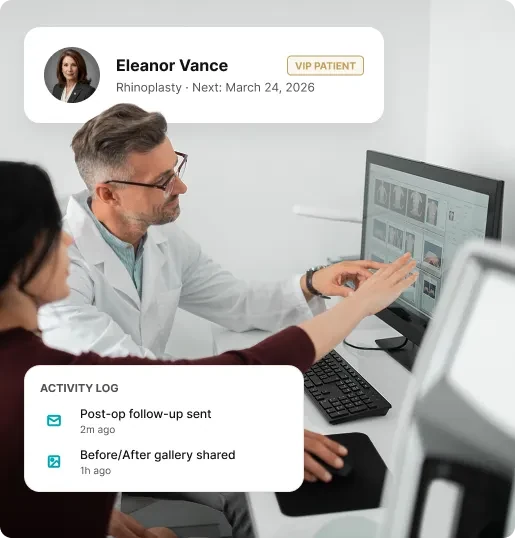
Nextech: promotional composition combining a consultation photograph and patient information. This is not a complete application screen. Source: vendor website.
Check before choosing: Confirm the exact products in the proposal. A capability listed under the Nextech umbrella is not proof that it comes with every EHR subscription; ask how TouchMD, CRM and payments are packaged.
Price and buying terms
No public dollar amount verified on the reviewed specialty page. Request a configuration-specific quote.
Compare it for: practices combining cosmetic self-pay services with insurance-billed surgery.
ModMed describes plastic surgery-specific charting, photo annotation, digital forms, cosmetic quoting and billing. Its documentation explicitly distinguishes self-pay cosmetic quotes from insurance claims. It also describes surgical and nonsurgical workflows within the same patient chart.
That combination deserves attention when your practice needs to manage both types of work without treating every visit as the same transaction. In a demonstration, have the vendor show a quote revision, the related clinical record and the billing view. Then repeat the exercise for a different payer scenario. The point is to inspect the workflow your team uses, not simply confirm that a billing menu exists.
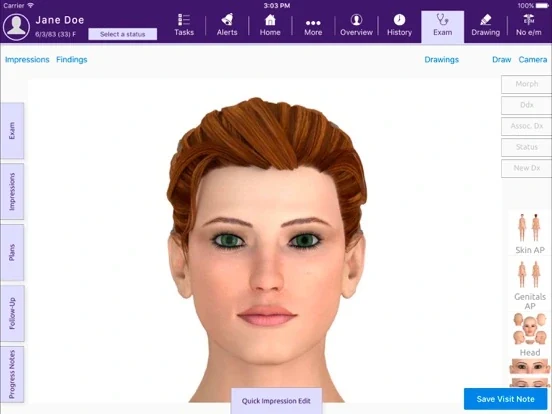
ModMed’s official EMA app screenshot shows an anatomical face model, examination tabs and visit-note controls. This is a general EMA illustration, not a verified plastic surgery configuration. Source: official product material.
Check before choosing: Have the vendor identify which administrative, payment and revenue-cycle services are included. ModMed's solution comparison identifies certain payment and RCM services as add-ons.
Price and buying terms
Custom pricing based on specialty, provider count and selected software or services; request a quote.
Compare it for: teams that want charting, patient communication and photography available across the working day.
Symplast's EHR documentation lists customizable clinical templates, digital consents, photo organization, annotation and virtual consultations. Its broader platform also includes scheduling, patient messaging, payments and CRM. The vendor puts particular emphasis on mobile use.
For a team moving between consultation rooms, the useful evaluation is practical: open a record, find the previous photographs, add a note and hand the next task to another staff member. Test that sequence on the devices your team expects to use. A mobile-oriented product should still be evaluated for the work done at reception and in the billing office.
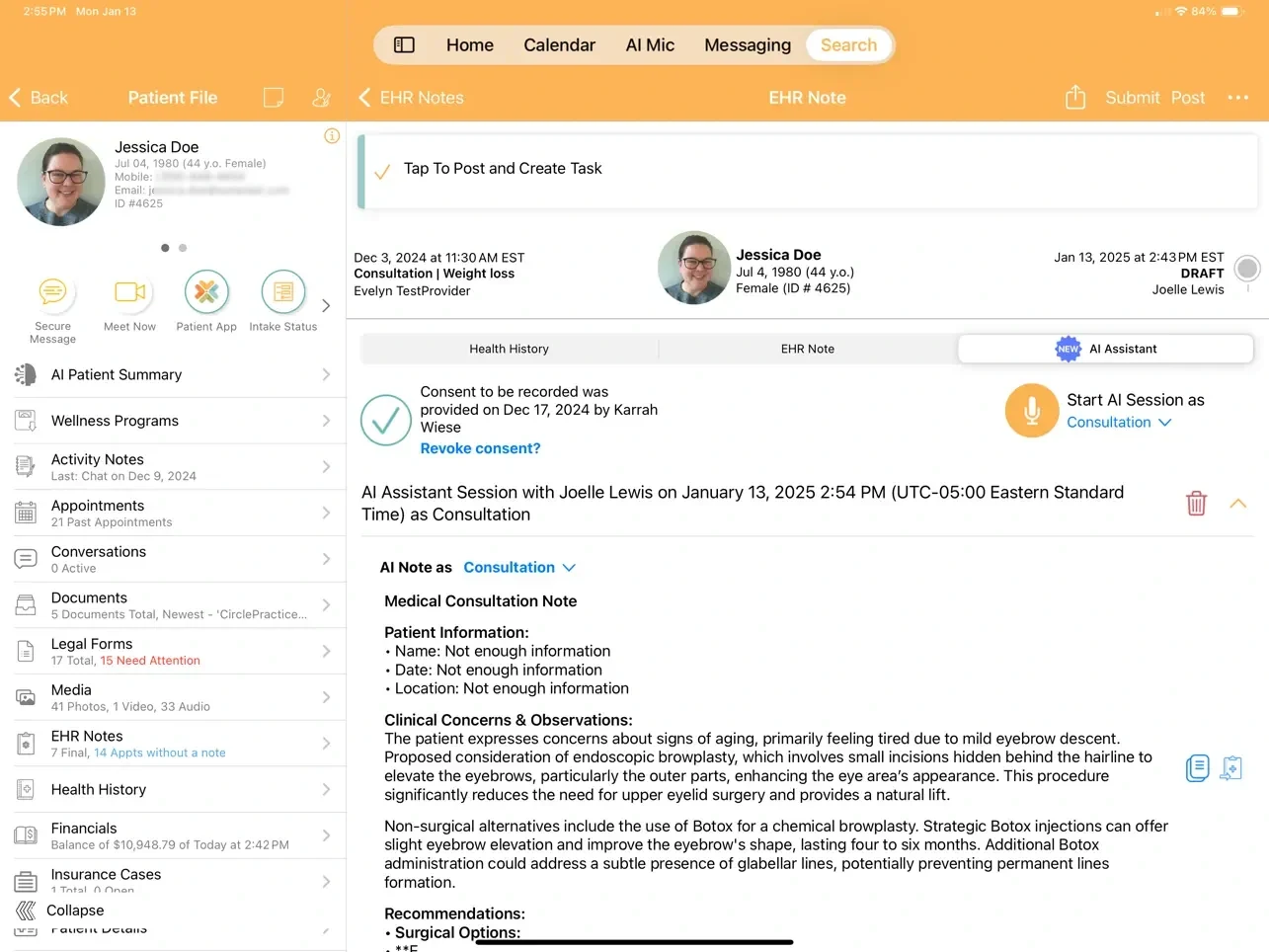
Symplast’s publisher-provided iPad screenshot shows a patient file, EHR note and AI Assistant panel, with appointments, documents, media and financial navigation. Source: official product material.
Check before choosing: Separate the software proposal from optional growth services. The current site presents Launch as the platform offering and separate service-led packages; clarify what your contract purchases.
Price and buying terms
No public dollar amount verified on the reviewed Launch page. Request a written software and implementation quote.
Compare it for: practices wanting to evaluate clinical and inquiry workflows in the same suite.
PatientNow's plastic surgery page connects lead capture, provider and room scheduling, clinical photography and billing. The published workflow examples include website inquiries entering the CRM, follow-up sequences and guided photo capture. This gives buyers several concrete screens to inspect before a sales call.
The pricing page lists EMR, practice management, lead management, communications, treatment quoting and before-and-after photos in Standard. It describes expanded automation and other capabilities in higher plans. Ask the team to demonstrate the proposed plan rather than the complete product portfolio, especially if marketing automation is a major reason for switching.
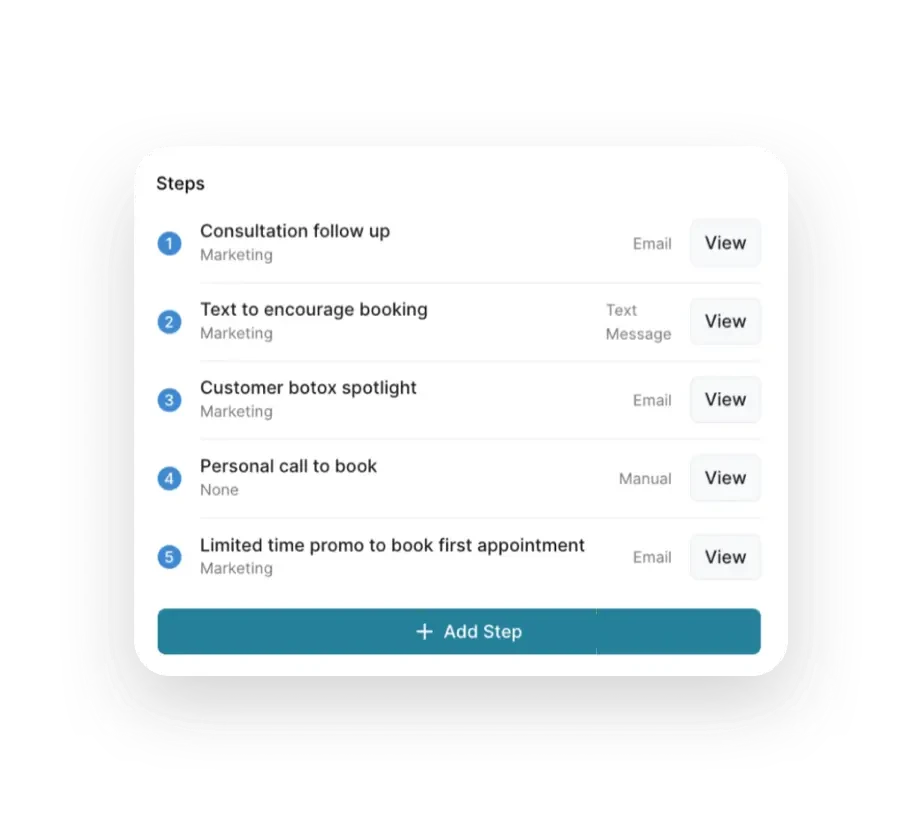
PatientNow: vendor illustration of a follow-up sequence combining email, text and a manual call task. Source: vendor website.
Check before choosing: Confirm marketing limits, user capacity, optional features and the photography configuration. Also check which tasks remain with your staff after the automated sequence runs.
Price and buying terms
Practice-specific quotes; the current pricing page does not publish a dollar amount for its plans.
Compare it for: practices comparing scheduling, records and billing in a configurable suite.
Remedly documents clinical records, room and device scheduling, patient forms, billing, portal access and reporting. It also lists marketing functions and integration options, including a Leads API. This makes it a candidate when the purchasing discussion spans both clinical administration and financial operations.
Bring your existing forms and an example of a difficult scheduling situation to the demonstration. Ask how a template is changed, who can change it and whether the change affects existing records. For a growing practice, walk through how the same patient is handled across locations rather than relying on a general statement about multisite support.
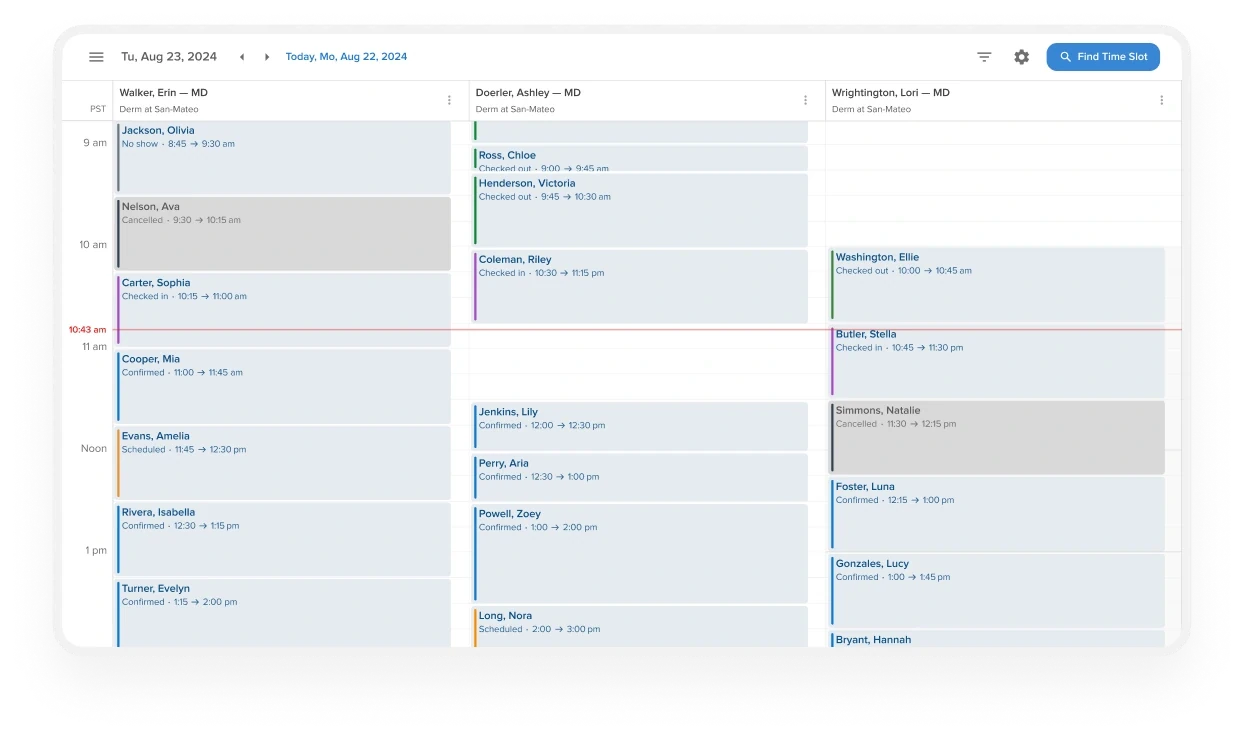
Remedly’s scheduling example shows a daily calendar organized by provider, appointment status and time, with a Find Time Slot control. The vendor’s example uses a dermatology practice. Source: official product material.
Check before choosing: The current pricing page marks inventory management as 'SOON.' Do not count that item as available based on this page. Verify required features against the version included in your quote.
Price and buying terms
Official FAQ says pricing starts at $90 per month, but does not identify the complete scope of that starting configuration. Provider count, locations, features and requirements affect the quote.
Aesthetic treatment records and practice management
Aesthetic Record
Compare it for: surgery practices with a substantial injectables or nonsurgical aesthetics service.
Aesthetic Record lists procedure charting, photo management, booking, inventory, memberships and patient portal functions. Its photography documentation describes visit-linked images, side-by-side comparisons and positioning assistance. The product therefore merits a look when repeated aesthetic treatments and their documentation are central to daily operations.
Use a treatment visit to inspect how the note, photographs, product usage and checkout relate to each other. A surgical practice should also demonstrate its surgical workflow separately. An appealing injectables workflow does not, by itself, establish suitability for all the practice's operative documentation or insurance needs.
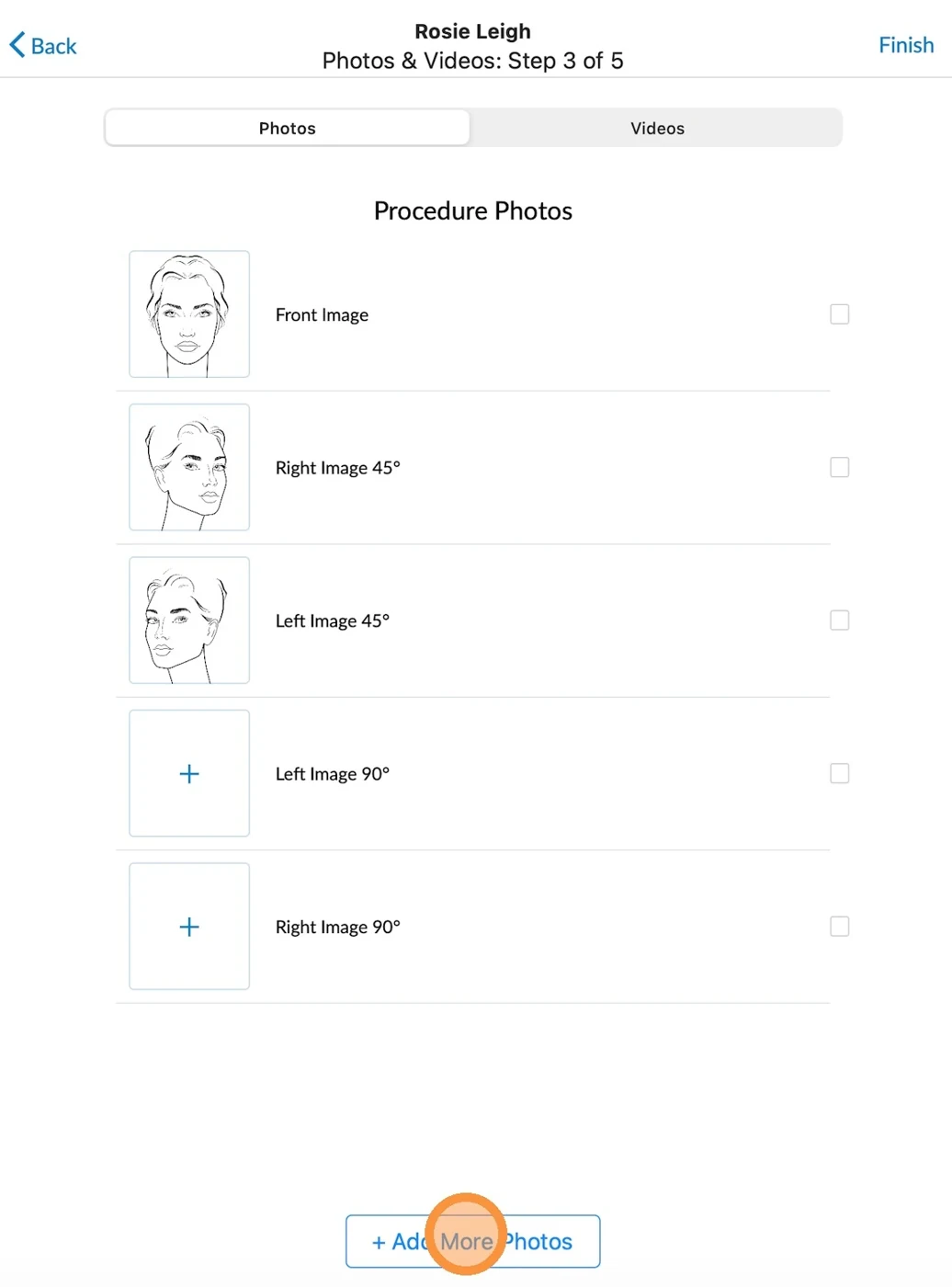
Aesthetic Record’s official guide shows the app’s procedure-photo step, with front, 45-degree and 90-degree image slots and an Add More Photos button. Source: official product material.
Check before choosing: Budget for users and optional services, not only the headline subscription. The pricing page separately lists prescribing and other options, and identifies plan-dependent integrations.
Price and buying terms
Essentials: $15 per user per month. Accelerator: $19 per user per month. Both show a $399 startup and onboarding charge. Enterprise is quoted; optional services can add costs.
Compare it for: practices improving the visual consultation while retaining their clinical system.
TouchMD Consult presents practice-selected images, videos and educational material on an iPad or Windows touchscreen. The vendor describes drawing on patient photographs and making consultation material available through the patient's myTouchMD app. The wider TouchMD product family also includes photography, digital consents and telehealth.
Evaluate it at the point where an explanation needs a picture: choosing a relevant example, annotating a patient's image and showing what the patient can review afterward. This is a different buying decision from replacing the EHR. Its value to your team depends partly on how naturally the consultation content fits into the existing appointment.
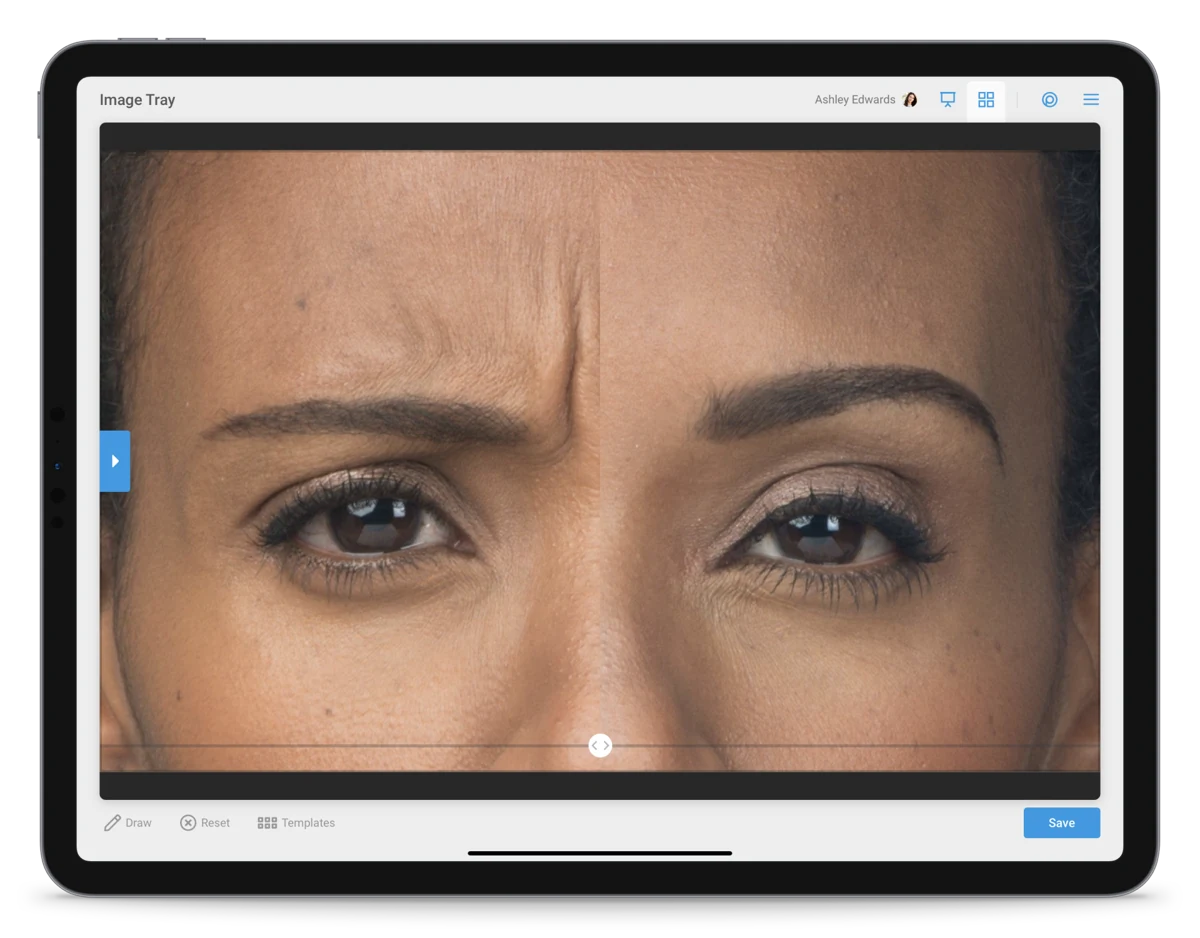
TouchMD: vendor composition showing photo comparison and annotation controls on a tablet. Source: vendor website.
Check before choosing: Ask which TouchMD products and EHR connections are included. A consultation application, photography module and consent workflow may require different configuration and training.
Price and buying terms
No public dollar amount verified on the reviewed product pages. Request a quote for the selected products and integration.
Dedicated 3D capture hardware and simulation software
Canfield VECTRA XT
Compare it for: practices evaluating an in-office 3D imaging installation.
VECTRA XT is a capture system paired with imaging software. Canfield describes face, breast and body capture, measurement tools, simulated changes and comparison of alternative scenarios. Its product page also describes patient access through ViewMyConsult.
This is not an EHR subscription or a replacement for the practice's scheduling and billing system. Evaluate the physical capture process alongside the software: where the equipment goes, who operates it, how images are associated with the right patient and how the surgeon retrieves them during a consultation. Have the team inspect the actual comparison views, rather than assessing the product from a single promotional rendering.
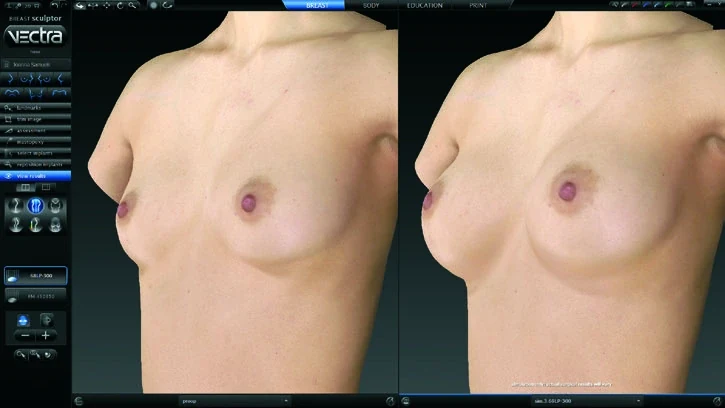
Canfield’s VECTRA brochure shows the Breast Sculptor interface with side-by-side 3D views, a left-hand tool panel and viewing controls. These are simulated views, not clinical outcome evidence. Interface details may vary by version. Source: official product material.
Check before choosing: Separate hardware, software, support and training in the proposal. This guide describes published functionality and does not assess simulation accuracy or predict surgical outcomes.
Price and buying terms
Quote required on the official product page. No verified public purchase price is reported here.
Compare it for: practices exploring simulation from photos and remote consultation workflows.
Crisalix's plans page describes converting photographs into 3D models, mobile simulation for face, breast and body, videoconferencing and virtual-reality viewing. It also lists optional patient-journey and marketing modules. Its core evaluation belongs beside other simulation tools, not in a table of EHR billing features.
Ask to see the complete path from image capture to the consultation view, including what happens when an image needs to be retaken. For remote consultations, inspect what the patient supplies, what the clinician controls and what remains accessible afterward. Keep the intended simulation workflow separate from any additional lead-generation or branded-app purchase.
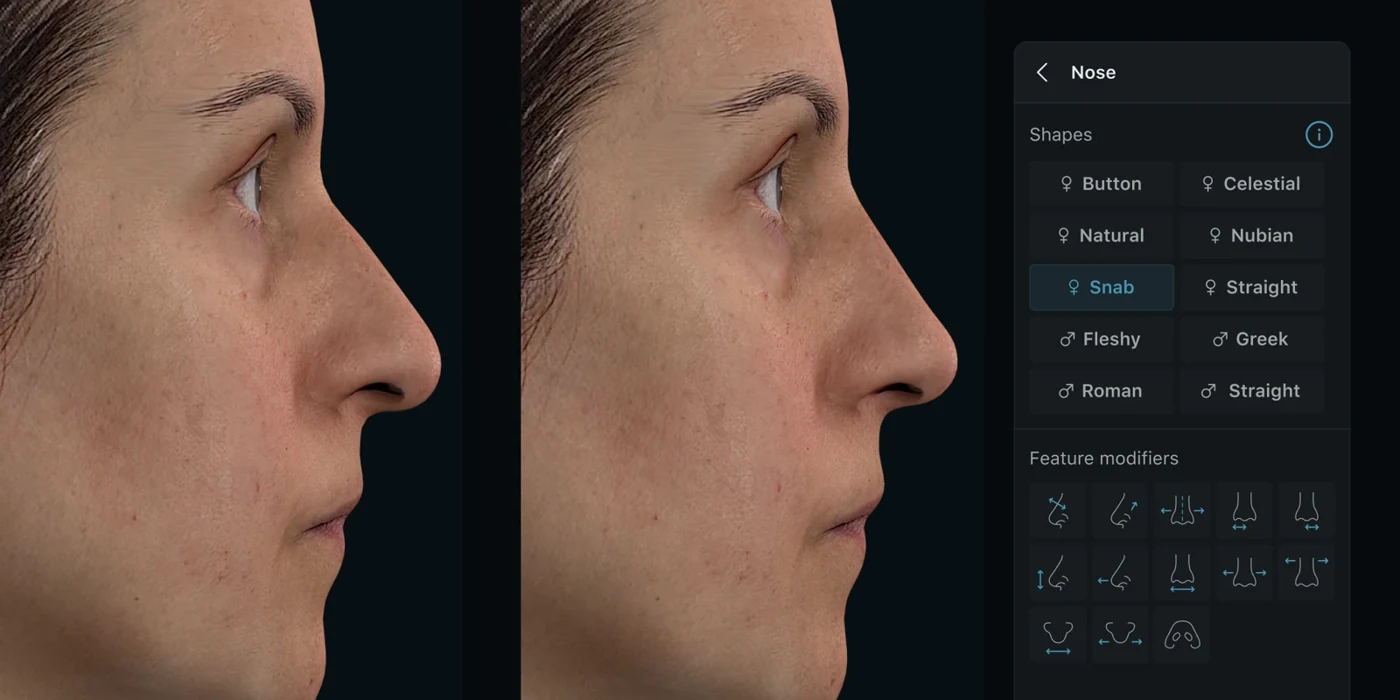
Crisalix’s official media library illustrates a facial simulation with the Nose tool open, including shape presets and feature modifiers. This is a software demonstration, not an outcome prediction validated by Forge. Source: official product material.
Check before choosing: Confirm patient allowances, fair-use terms and optional modules. The plans page distinguishes patient-volume arrangements; do not assume that every quoted plan provides unlimited use.
Price and buying terms
The official plans page directs buyers to a demo or quote; no public dollar amount was verified.
Compare it for: practices retaining an EHR but changing how inquiries are handled.
MyMedLeads describes capturing website inquiries and calls, keeping communication history and running email, text and call-task sequences. Its reporting connects lead sources with recorded appointments and revenue. Its integration page describes transferring a lead into practice management software and lists Nextech, PatientNow and Symplast among the partners.
The useful demonstration starts before a patient chart exists. Have the coordinator handle a new inquiry, record a response and move the person into scheduling. Then ask how a canceled consultation or changed appointment is reflected. That second step matters because transferring contact details once is different from maintaining a current patient journey.
Nextech acquired MyMedLeads in 2021. They are part of the same vendor group, so ask how the current MyMedLeads offer relates to Nextech's CRM proposal.
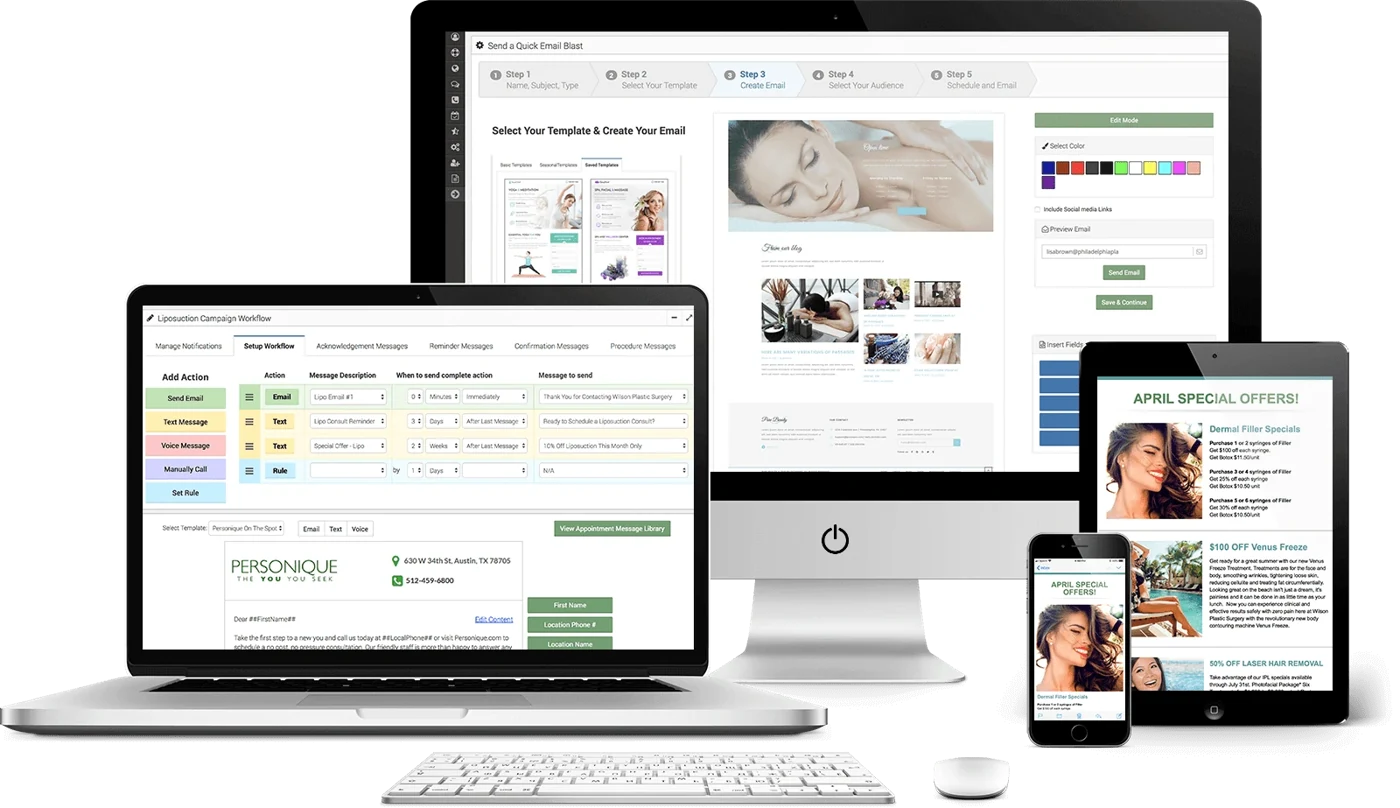
MyMedLeads’ published product composition shows email creation and a campaign workflow with email, text and call actions, alongside mobile message previews. This published illustration may not reflect the current layout. Source: official product material.
Check before choosing: Verify the currently sold product, your exact EHR version and the available integration with sales. The public integration list alone does not establish every synchronized field or supported direction. The published MyMedLeads contract terms also provide for setup and additional-support charges where applicable; ask sales which terms and order form govern your quote.
Price and buying terms
The official pricing page describes one fee per office with unlimited users, but shows no dollar amount. Request a current quote.
Compare it for: coordinators who need a shared inbox, visible lead stages and follow-up workflows.
Aesthetix CRM describes a shared inbox for calls, email, text and social conversations, together with pipelines and automated follow-up. Its integration directory lists clinical and booking products, including Nextech, ModMed and PatientNow configurations. The pricing FAQ explicitly includes US availability.
For a plastic surgery coordinator, the question is whether the system makes the next action clear: who owns an inquiry, whether a response arrived and what should happen after a consultation. Ask the vendor to demonstrate one lead across the inbox, pipeline and scheduling connection. Then inspect which events populate the reports automatically and which depend on staff entering a status or value.
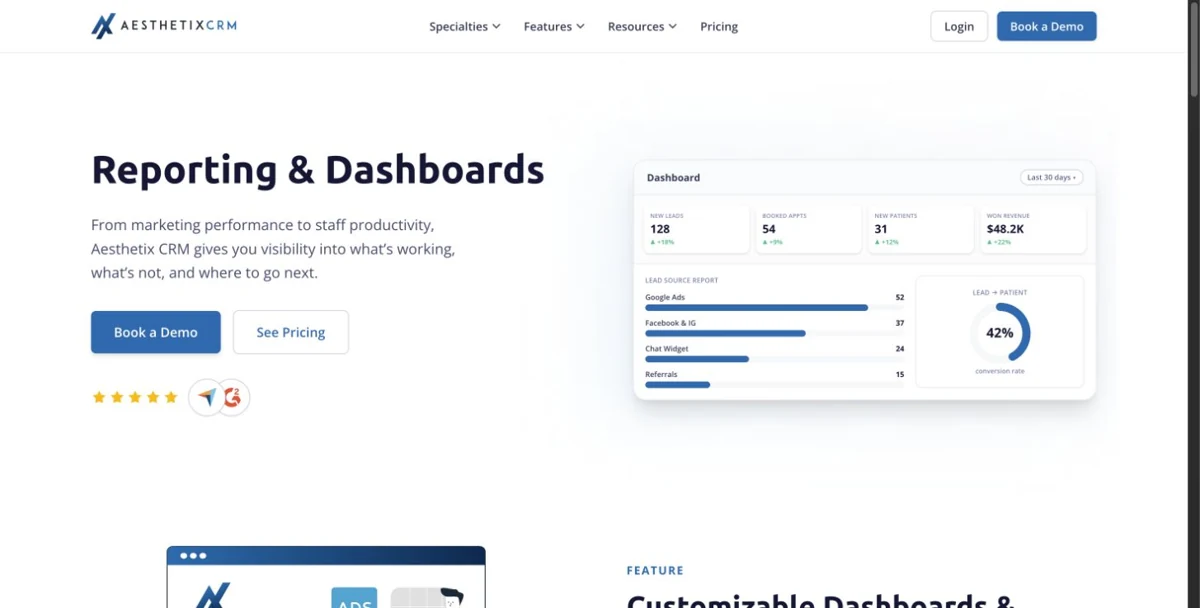
Aesthetix CRM: screenshot of the public reporting page, with an illustrative dashboard. This is not a logged-in account. Source: vendor website.
Check before choosing: Confirm integration fees, messaging usage and reporting inputs. A pipeline value or forecast should not be presented internally as collected revenue unless that connection has been established.
Price and buying terms
Plus $299/month, Pro $399/month and Grow $499/month are displayed publicly. Required onboarding starts at $1,500. Multilocation is custom-priced; messaging and optional capabilities can add charges.
Compare the cost of the configuration your team will use, including implementation and ongoing usage. A per-user subscription, an office-level CRM fee and a hardware purchase have different cost structures. The lowest number on a pricing page cannot tell you which arrangement is least expensive for your practice.
Ask for a written quote separating software, onboarding, migration, training, messaging, payment processing and optional services. For imaging, include capture equipment, workstation requirements, maintenance and support. For a CRM, include the connection to your existing clinical system and any recurring connector charges. Ask what happens to the price when you add a surgeon, coordinator or location.
Build the changeover plan before canceling the old system. Decide who checks imported records, who handles appointments already booked, and how the team accesses historical photos. A successful sample migration should include a complicated record, not just a name, phone number and empty chart.
Integrations, APIs and exports: ask what actually moves
An integration listing is a starting point, not proof that every field synchronizes. Define the handoff you need: a new inquiry becoming a patient, a consultation being booked, a quote being accepted, or a payment appearing in a report. Ask the vendor to show the source, destination and update behavior for that specific event.
If your team needs API access, request the documentation, permitted operations, authentication method, limits and commercial terms before signing. Separately request an example export containing the records you need to retain, including photographs and signed documents where applicable. A downloadable contact list does not answer whether the full clinical history can be moved. No API was tested for this guide.
Use the same patient journey in every demo
A consistent demonstration makes differences easier to see than a vendor's feature tour. Use a fictional patient and follow the work across your actual roles. The surgeon should review charting, the coordinator should handle the inquiry and quote, and the person responsible for billing should reconcile the transaction.
Create an inquiry from a website form and assign it to a coordinator.
Reply, record the conversation and book a consultation without creating duplicate records.
Complete intake, add photographs and prepare the clinical note.
Create or revise a quote, collect a deposit and show the balance.
Find the follow-up task and identify which staff member owns it.
Export the relevant record and explain how access would work after cancellation.
For imaging tools, replace the billing steps with capture, comparison and patient sharing. Ask the surgeon to assess the workflow directly. A simulated image is a consultation aid, not a promised surgical result, and this comparison does not assess clinical accuracy.
Questions practices ask before choosing
Does a plastic surgery practice need both an EHR and a CRM?
It depends on what the existing system already handles. Several suites here include lead management or communication tools. A separate CRM is worth evaluating when your team needs a different inquiry workflow, but demonstrate the booking handoff and reporting first. Otherwise, staff may have two places to maintain the same patient status.
Can a 3D simulator replace clinical photography?
Do not treat them as the same purchase. Simulation explores a possible change; photography records what was captured at a particular visit. Products may offer both, but ask how original images, simulations and follow-up photographs are labeled and stored. Keep those distinctions clear when reviewing the record with a patient.
Which option should a small practice start with?
Begin with the work your team cannot currently complete reliably. If scheduling and charting are the problem, compare core systems. If the clinical system is working and unanswered inquiries are the problem, examine its existing tools before adding a CRM. Request a quote for your real user count and required modules.
How this comparison was researched
Reviewed October 29, 2026. This is a comparison of official product, pricing and integration documentation, not a hands-on software test or an absolute ranking. Fit assessments are editorial judgments about the workflows described. We did not open trial accounts, submit quote requests or independently verify vendor performance claims. Public prices are reported with their billing units and stated setup costs; an unverified price is labeled accordingly. The guide is written for US buyers, but inclusion does not establish availability of every product, integration or payment feature in every state. Confirm the exact US configuration with the vendor. Images, where shown, are publisher-provided screens or compositions rather than screenshots from our own accounts.
This is a selection of relevant products, not an exhaustive market directory. “Best” means a fit for a defined workflow. Product names, capabilities and prices can change; the linked official sources let you check the current offer.
.svg)